> For the complete documentation index, see [llms.txt](https://docs.easycalling.easyplatform.app/llms.txt). Markdown versions of documentation pages are available by appending `.md` to page URLs; this page is available as [Markdown](https://docs.easycalling.easyplatform.app/user-guides/tips-and-tricks.md).
# Tips and Tricks
Work smarter with these time-saving tips for Easy Calling
**Master Easy Calling with these pro tips.** Here's how experienced agents save time every day.
***
## Quick Wins (Do These Right Away)
### 1. Pin Easy Calling to Your Sidebar
**Why:** Access Easy Calling with one click instead of searching for it.
**How to do it:**
1. Open Easy Calling in Microsoft Teams
2. Right-click the app icon
3. Select **"Pin"**
**Time saved:** 5-10 seconds every time you open it (adds up to 30+ minutes per week)
***
### 2. Enable Desktop Notifications
**Why:** Never miss a call, even when you're working in another app.
**How to do it:**
1. Go to **Microsoft Teams Settings** → **Notifications**
2. Ensure **"Incoming calls"** is enabled
3. Set notification sound to your preference
**Time saved:** Catch calls instantly instead of checking the dashboard every few minutes.
***
### 3. Use the Search Bar in Call History
**Why:** Find past calls in 3 seconds instead of scrolling forever.
**How to do it:**
* Type the caller's name, number, or keywords from your notes
* Press Enter
**Example:** Manager asks, "Did we hear from Acme Corp today?" Type "Acme" → Found in 3 seconds.
***
### 4. Create Email Templates for Common Responses
**Why:** Send follow-up emails in 10 seconds instead of typing the same thing over and over.
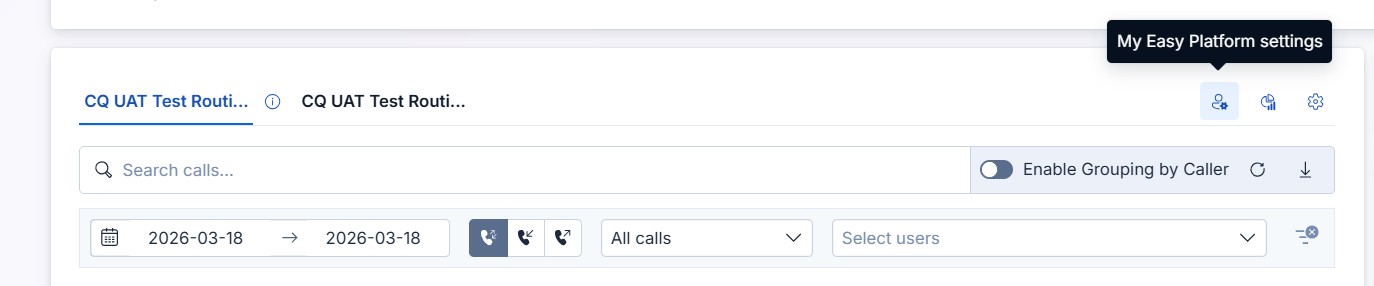
Create New Email Templates using the "My Easy Platform Settings"
**How to do it:**
1. Click **"My Easy Platform Settings"** to open the **My Easy Platform**
2. Click **Seetings** (on the left side of your name) and choose the tab **Email template**
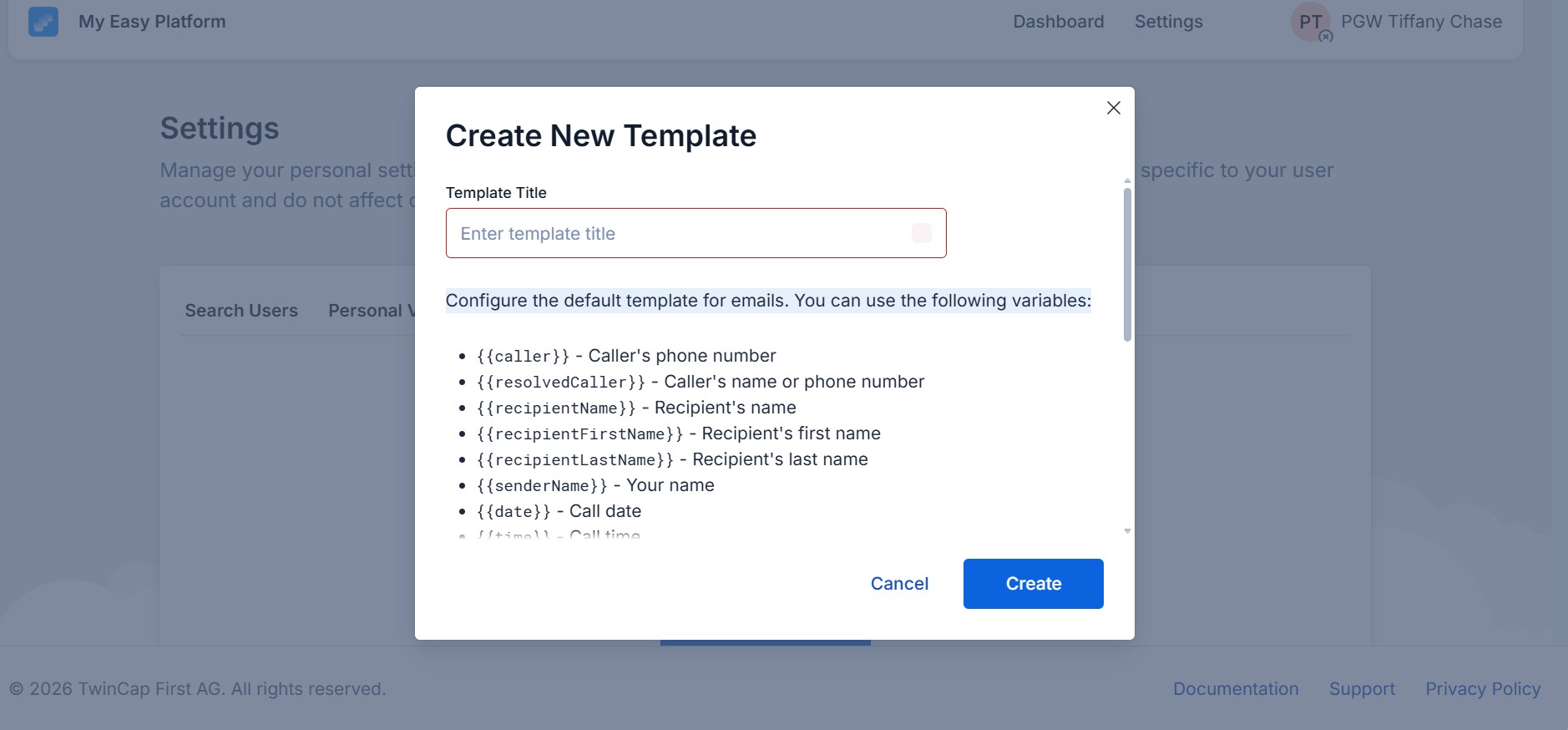
3. Set up Templates for common scenarios using variables
4. Click **"Create"** to save your Email template
**Time saved:** 2-3 minutes per email = 30-60 minutes per day
Create email templates with useful variables to save time
***
## Advanced Tips for Agents
### 5. Take Notes During the Call (Not After)
**Why:** You'll remember more details, and follow-ups are easier.
**How to do it:**
* While the caller is speaking, type quick notes in the **notes section**
* Use shorthand or bullet points
* Clean up the notes after the call if needed
**Example:**
```
- Password reset for admin account
- Emailed instructions to john@acme.com
- Follow-up needed: Check if issue resolved tomorrow
```
**Time saved:** No need to try remembering what was discussed–it's all documented.
***
### 6. Use Color-Coded Filters to Prioritize Callbacks
**Why:** Spot missed calls and voicemails at a glance.
**How to do it:**
1. Open **Call History**
2. Click **"Missed Calls"** filter (shows red indicator)
3. Review and create tasks for callbacks
**Pro Tip:** Do this first thing in the morning and after lunch to ensure no callbacks slip through the cracks.
***
### 7. Create Personal Tasks for Quick Callbacks
**Why:** Get reminders without cluttering your team's Planner.
**How to do it:**
* Click **"Create Task"** after a call
* Choose **"Personal Task"** (Microsoft To-Do)
* Set a due time (e.g., "Call back at 2:00 PM today")
**Time saved:** No more sticky notes or trying to remember callbacks.
***
### 8. Transfer with Context Notes
**Why:** The next agent knows what's going on without making the customer repeat themselves.
**How to do it:**
* Before transferring, add a note:
* *"Customer needs billing help – account #12345"*
* *"VIP customer, very frustrated"*
* *"Already tried password reset – didn't work"*
**What the customer experiences:** *"Oh, I see you already tried that. Let me check something else..."*
**Result:** Customers feel heard, transfers are seamless.
***
### 9. Save Frequent Callers as Contacts
**Why:** Next time they call, you'll instantly see their name.
**How to do it:**
* After a call, click the **person icon**
* The caller is saved to your Microsoft contacts
**Pro Tip:** Do this for anyone who calls more than once a month.
***
### 10. Use the "Opt Out" Feature Strategically
**Why:** Avoid burnout by controlling when you receive calls.
**When to use it:**
* You're in a meeting or training
* You need 30 minutes of focus time for urgent tasks
* You're about to leave for the day
**How to do it:**
1. Toggle your status to **"Unavailable"**
2. Other agents will cover calls
3. Toggle back to **"Available"** when you're ready
**Pro Tip:** Coordinate with your team so someone is always available.
***
## Tips for Voice App Managers
### 11. Check the Dashboard Every Hour
**Why:** Catch issues before they become problems.
**What to look for:**
* Are wait times climbing?
* Are multiple agents on break at the same time?
* Are calls piling up in the queue?
**Action:** Send a quick Teams message to the team if you spot an issue.
***
### 12. Export Weekly Reports on Monday Morning
**Why:** Share performance data with leadership without scrambling.
**How to do it:**
1. Set **time range**
2. Open **Analytics**
3. Click **"Export PDF"**
4. Email to your manager
**Time saved:** 30 minutes of manual data gathering.
***
### 13. Setup Voicemail Greetings
**Why:** Set customer expectations during holidays, training, or system outages.
**Examples:**
* *"Our team is currently in training. Wait times may be longer than usual."*
* *"Our office is closed for the holiday. We'll return your call on \[date]."*
* *"We're experiencing high call volume. Please leave a message, and we'll call you back within 4 hours."*
**How to do it:**
1. Go to **Voice App Manager** → **Calling Configuration** → **Audio Configuration**
2. Record a new greeting
3. Save
**Time taken:** 2 minutes.
***
### 14. Use Analytics to Understand Queue Performance
**Why:** Data-driven decisions improve service levels and team efficiency.
**How to do it:**
1. Set **time range**
2. Open **Analytics**
3. Review call queue statistics and look for patterns:
* **High missed call rates** → Review staffing or queue capacity
* **Long average wait times** → Consider adding more agents to the queue
* **Consistently good answer rates** → Recognize and share the winning approach with the team
**Pro Tip:** Share positive stats with the team in weekly meetings to boost morale.
***
## Workflow Hacks
### 15. Use Two Monitors (If Possible)
**Setup:**
* **Monitor 1:** Microsoft Teams + Easy Calling
* **Monitor 2:** CRM, email, or reference materials
**Why:** No more alt-tabbing between apps.
***
### 16. Use Microsoft To-Do for Daily Callbacks
**Why:** Keep personal callbacks separate from team tasks.
**How to do it:**
* Create a To-Do list called "Callbacks"
* Add tasks with due times
* Get reminders throughout the day
**Example:**
* [ ] 10:00 AM – Call Sarah about invoice #12345
* [ ] 2:00 PM – Follow up with Tom on password reset
* [ ] 4:00 PM – Call Jane about software update
***
## Common Mistakes to Avoid
### Forgetting to Toggle Back to "Available"
**Problem:** You go on break, toggle to "Unavailable," and forget to toggle back. Calls keep going to other agents.
**Solution:** Set a timer or reminder to toggle back after your break.
***
### Not Adding Notes During Calls
**Problem:** You finish the call and can't remember the details.
**Solution:** Type notes while the caller is speaking. Even bullet points help.
***
### Transferring Calls Without Context
**Problem:** The next agent has no idea what the call is about. The customer has to repeat everything.
**Solution:** Always add a note before transferring: *"Customer needs help with \[issue]"*
***
### Ignoring Missed Calls
**Problem:** Missed calls pile up, and customers don't get callbacks.
**Solution:** Check the "Missed Calls" filter daily and create tasks for callbacks.
***
### Not Using Search in Call History
**Problem:** You scroll through hundreds of calls trying to find one from yesterday.
**Solution:** Use the search bar! Type the caller's name or number.
***
## Learn More
* [**Quick Start Guide**](/getting-started/quick-start-guide.md) – Get up to speed in 5 minutes
* [**Best Practices – Call Life Cycle**](/getting-started/best-practices-call-life-cycle.md) – Step-by-step walkthrough
* [**Day in the Life Guides**](/user-guides/contact-center-agent.md) – See how real users work with Easy Calling
***
**Ready to work smarter?** Try 3 tips from this list today and see the difference!