# Easy Calling in Microsoft Teams

**Welcome to the visual tour!** This guide shows you what Easy Calling looks like and how each feature helps you handle calls more efficiently.

***

## Overview of Features

### Administration and Configuration

*For Administrators and Voice App Managers only.*

<table><thead><tr><th width="374">Feature</th><th width="374">Info</th></tr></thead><tbody><tr><td><a href="../../feature-categories/administration-and-configuration#1-queue-management">Queue Management</a></td><td>Administrative control over logic and assignment of service lines</td></tr><tr><td><a href="../../feature-categories/administration-and-configuration#2-agent-management-central-opt-inopt-out">Agent Management (Opt-in / Opt-out)</a></td><td>Centrally add or remove agents from queues to control team capacity</td></tr><tr><td><a href="../../feature-categories/administration-and-configuration#3-custom-call-logic">Custom Call Logic</a></td><td>Design call flows for timeouts, announcements, voicemail, and hold music</td></tr><tr><td><a href="../../feature-categories/administration-and-configuration#4-escalation-management-and-overflow-timeout-control--routing">Escalation Management and Overflow</a></td><td>Define rules for unanswered calls – add-on license required</td></tr><tr><td><a href="#administration-and-configuration">Escalation to additional queue</a></td><td>Separate overflow queue with limited functions at an affordable price - Additional function "Escalation" required</td></tr><tr><td><a href="../../feature-categories/administration-and-configuration#5-on-call-availability-and-duty-management">On-Call (Availability and Duty Management)</a></td><td>Plan and manage on-call schedules and availability – Additional function “On-Call” required</td></tr><tr><td><a href="../../feature-categories/administration-and-configuration#6-webhooks">Webhooks</a></td><td>Configure webhook triggers at the start and/or end of a call</td></tr><tr><td><a href="../../feature-categories/administration-and-configuration#7-configuration-center">Configuration Center</a></td><td>Central web portal for all system management</td></tr></tbody></table>

### Call Management (Inbound and Outbound)

*For all users.*

| Feature                                                                                                                                               | Info                                                                   |
| ----------------------------------------------------------------------------------------------------------------------------------------------------- | ---------------------------------------------------------------------- |
| [Queue Display](https://docs.easycalling.easyplatform.app/feature-categories/call-management#1-queue-display)                                         | Real-time view of all callers currently waiting                        |
| [Intelligent Caller Recognition](https://docs.easycalling.easyplatform.app/feature-categories/call-management#2-intelligent-caller-recognition)       | Instant caller identification via third-party integrations             |
| [Call Handling and Transfer](https://docs.easycalling.easyplatform.app/feature-categories/call-management#3-call-handling-and-transfer)               | Answer and transfer calls directly to colleagues or voicemail          |
| [Direct Calling from App (Outbound)](https://docs.easycalling.easyplatform.app/feature-categories/call-management#4-direct-calling-from-app-outbound) | Initiate outbound calls directly from Easy Calling                     |
| [After-Call Handling](https://docs.easycalling.easyplatform.app/feature-categories/call-management#5-after-call-handling)                             | Structured post-call processing with quick actions and email templates |
| [Voicemail](https://docs.easycalling.easyplatform.app/feature-categories/call-management#6-voicemail)                                                 | Automatic voicemail notifications available in call history            |
| [Agent Opt-in/Opt-out](https://docs.easycalling.easyplatform.app/feature-categories/call-management#7-agent-opt-inopt-out)                            | Agents can join or leave queues with a single click                    |

### Analytics and Reporting

*For Voice App Managers.*

| Feature                                                                                                                                     | Info                                                                     |
| ------------------------------------------------------------------------------------------------------------------------------------------- | ------------------------------------------------------------------------ |
| [Real-Time Dashboard](https://docs.easycalling.easyplatform.app/feature-categories/analytics-and-reporting#1-real-time-dashboard)           | Live overview of waiting, active, answered, and missed calls             |
| [Call History (CSV Export)](https://docs.easycalling.easyplatform.app/feature-categories/analytics-and-reporting#2-call-history-csv-export) | Export call data for external analysis and quality management (6 months) |
| [Statistics (PDF Export)](https://docs.easycalling.easyplatform.app/feature-categories/analytics-and-reporting#3-statistics-pdf-export)     | Visual statistics on call outcomes and duration                          |

### Integration

| Feature                                                                                                                                     | Info                                                            |
| ------------------------------------------------------------------------------------------------------------------------------------------- | --------------------------------------------------------------- |
| [Microsoft Teams Native](https://docs.easycalling.easyplatform.app/feature-categories/integration#1-microsoft-teams-native-integration)     | Full integration into the Teams environment (app and telephony) |
| [Third-Party System Integration](https://docs.easycalling.easyplatform.app/feature-categories/integration#2-third-party-system-integration) | Connect CRM or ERP systems for caller identification            |
| [Workflow Integration](https://docs.easycalling.easyplatform.app/feature-categories/integration#3-workflow-integration)                     | Seamless connection to MS Planner, Microsoft To-Do, and email   |
| [Multi-Platform](https://docs.easycalling.easyplatform.app/feature-categories/integration#4-multi-platform-support)                         | Via Teams app or web browser, device and OS independent         |

***

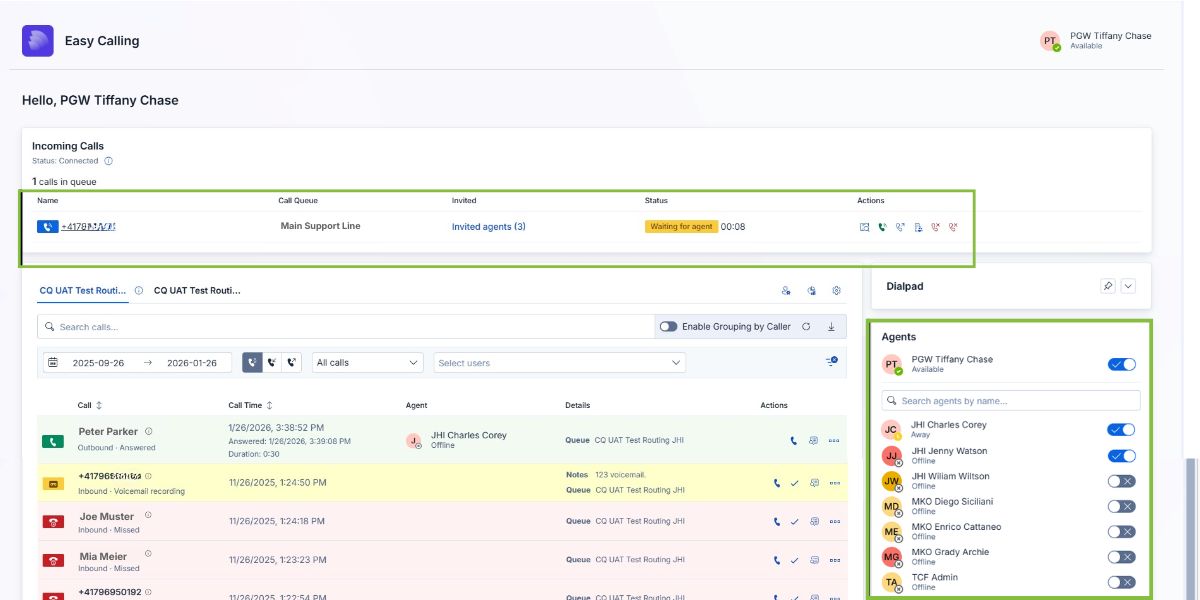
## The Dashboard: Your Command Center

**What you see when you open Easy Calling:**

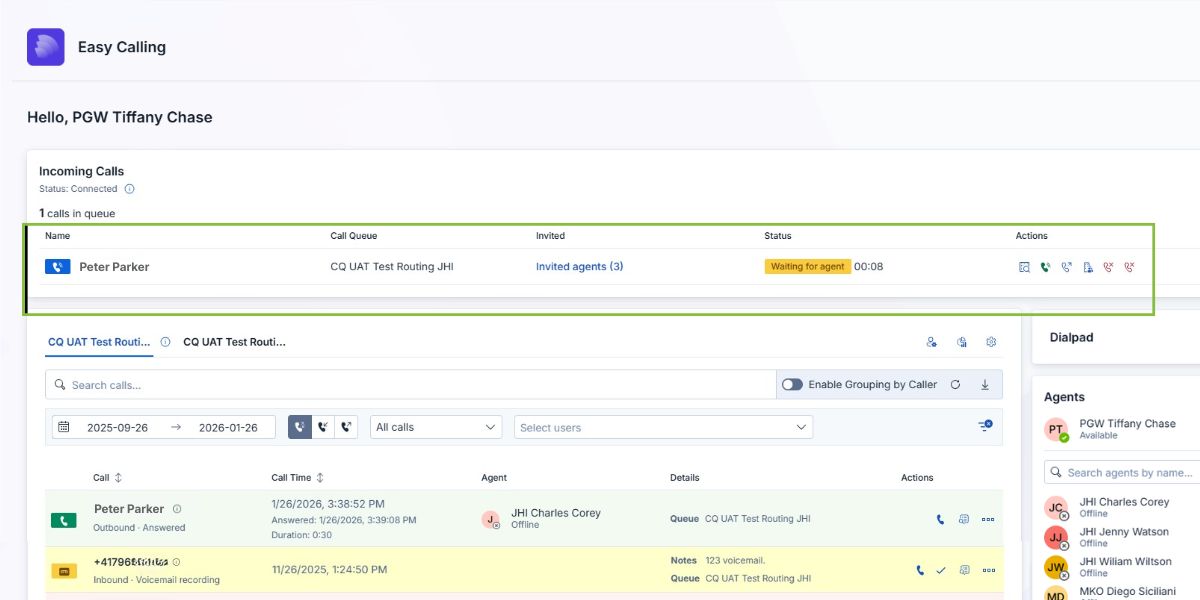
<figure><img src="https://8483818-files.gitbook.io/~/files/v0/b/gitbook-x-prod.appspot.com/o/spaces%2FdKIXVVI8Ve4TBJ4ft1WC%2Fuploads%2FqorA4CLSnp2lO4BW9viY%2FReal%20Time%20Agent%20Status.jpg?alt=media&#x26;token=282db1ed-5f7f-42ec-aa31-cf603916a3f2" alt="Easy Calling dashboard"><figcaption><p>Your Easy Calling dashboard – everything you need in one view</p></figcaption></figure>

### What This Means for You:

**No more guessing.** At a glance, you can see:

* **Who's calling right now** (and how long they've been waiting)
* **Which agents are available** vs. on calls
* **Your call history** with color-coded indicators
* **Voicemail notifications** you need to check

**Why this matters:** You stay informed without switching apps or asking colleagues "Are you on a call?" Everything you need is right here.

***

## Incoming Calls: Know Who's Calling Before You Answer

**When a call comes in, you'll see:**

<figure><img src="https://8483818-files.gitbook.io/~/files/v0/b/gitbook-x-prod.appspot.com/o/spaces%2FdKIXVVI8Ve4TBJ4ft1WC%2Fuploads%2FluQQB8EEDR9EYD19Mkd6%2FEasy%20Calling%20Dashboard.jpg?alt=media&#x26;token=b10095dc-d204-4e28-b8a4-79bf80ace2de" alt="Incoming call card"><figcaption><p>Incoming call with caller information and quick actions</p></figcaption></figure>

### What You See:

* **Caller's name and company** (if available in your directory or CRM)
* **Phone number**
* **How long they've been waiting** (in real-time)
* **Which call queue** the call came through
* **Quick action buttons** (View Details | Request Call | Direct Transfer | Transfer to Voice App | Reject Call | Force Cleanup)

### What This Means for You:

**Greet customers by name.** You know who's calling before you answer, so you can say:

* *"Hi Sarah, thanks for calling back!"* (instead of "Hello, how can I help you?")
* *"Good morning, Acme Corp–this is \[Your Name]. How can I help?"*

**Customers feel recognized**, and you sound professional from the first second.

***

## Caller Details: Everything You Need During the Call

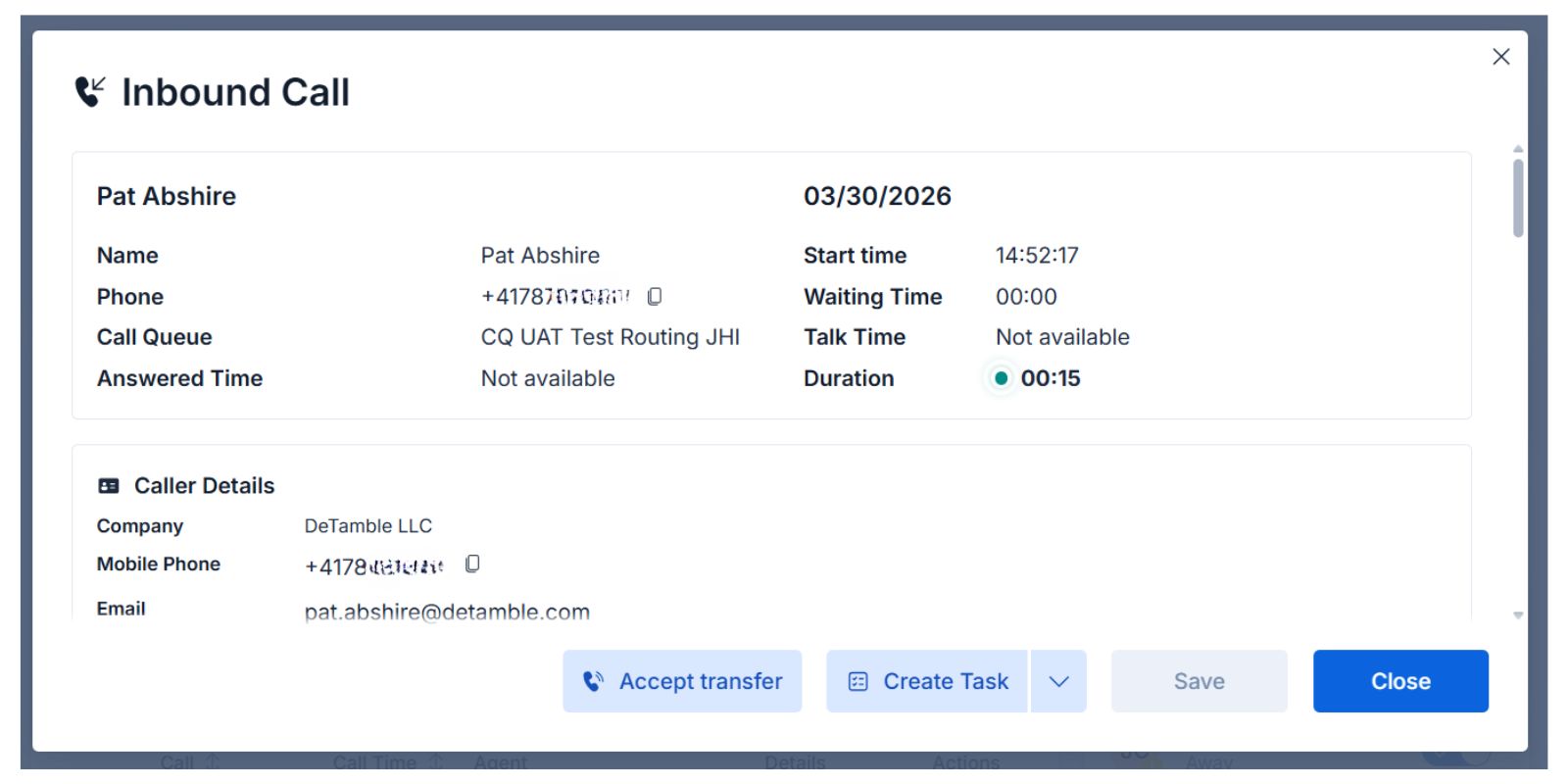
**Click "View Details" to see the full caller profile:**

<figure><img src="https://8483818-files.gitbook.io/~/files/v0/b/gitbook-x-prod.appspot.com/o/spaces%2FdKIXVVI8Ve4TBJ4ft1WC%2Fuploads%2FdTfonv7dtcQfKYrAF7QP%2FCaller%20Details%20Easy%20Calling.jpg?alt=media&#x26;token=3b732f5c-8d36-4e3d-a80e-3ee754dab703" alt="Caller details panel"><figcaption><p>All available information about the caller in one place</p></figcaption></figure>

### What You See:

* **Name**
* **Phone number(s)**
* **Call Queue**
* **Company name**
* **Email address** (for follow-up emails)
* **Notes from previous calls** (if any)
* **Past call history** with this caller
* **Quick action buttons** (Accept Transfer | Create Task | Save Contact | Close)

### What This Means for You:

**Reference past interactions.** If this customer called last week, you'll see the notes from that call. You can say:

* *"I see you called last Thursday about \[issue] – is this about the same thing, or something new?"*

**Follow up effortlessly.** After the call, click "Send Email" or "Create Task" without leaving the screen.

**No more scrambling.** All the caller's information is right there – no need to open your CRM, search Outlook, or ask colleagues.

***

## Transferring Calls: Seamless and Professional

### Option 1: Direct Transfer to a Specific Person

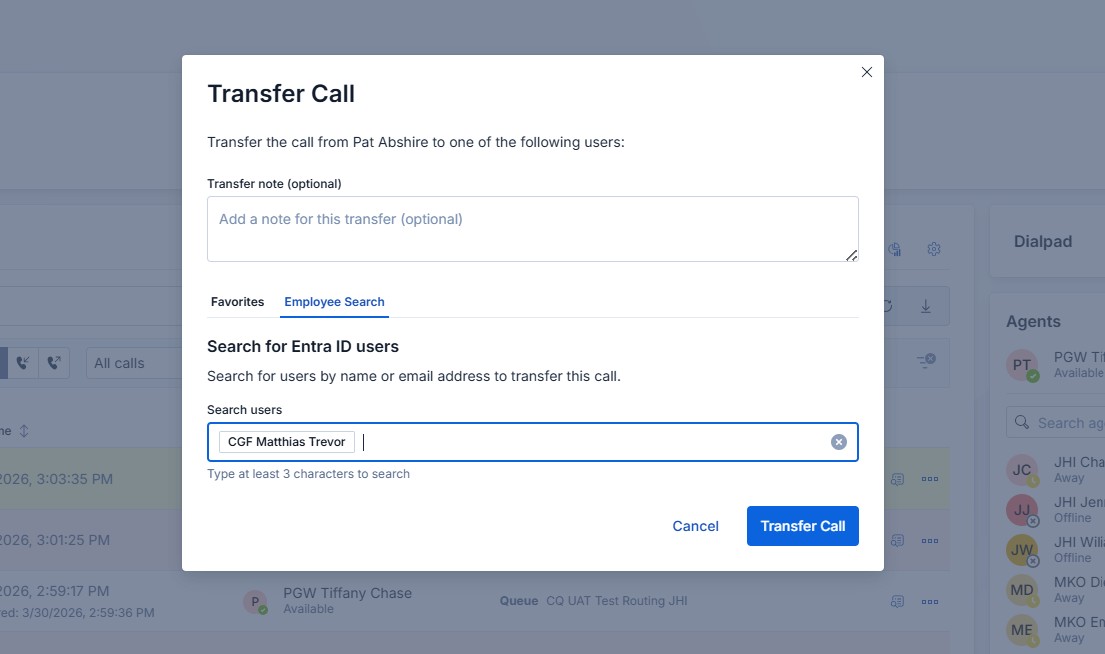
**Need to send the call to someone who can help?**

<figure><img src="https://8483818-files.gitbook.io/~/files/v0/b/gitbook-x-prod.appspot.com/o/spaces%2FdKIXVVI8Ve4TBJ4ft1WC%2Fuploads%2FRzdehwhzPrl3hgWHIsYu%2FTransfer%20Call%20Easy%20Calling.jpg?alt=media&#x26;token=d1e29157-9342-4b1e-b8a3-5e48c3276477" alt="Direct transfer dialog"><figcaption><p>Transfer directly to a colleague with one click</p></figcaption></figure>

**How it works:**&#x20;

1. Click **"Direct Transfer"**
2. Add a note (e.g., *"Customer needs help with billing"*)
3. Search for the person's name
4. Click **"Transfer Call"**

**What the customer experiences:**

* *"Let me connect you with John, who can help with that right away."*
* The call transfers in **3 seconds**
* John sees your note before he answers

**What would happen without Easy Calling:** You'd put the customer on hold, look up John's extension, manually transfer the call, and hope John picks up. The customer would have to re-explain everything.

***

### Option 2: Transfer to Another Call Queue

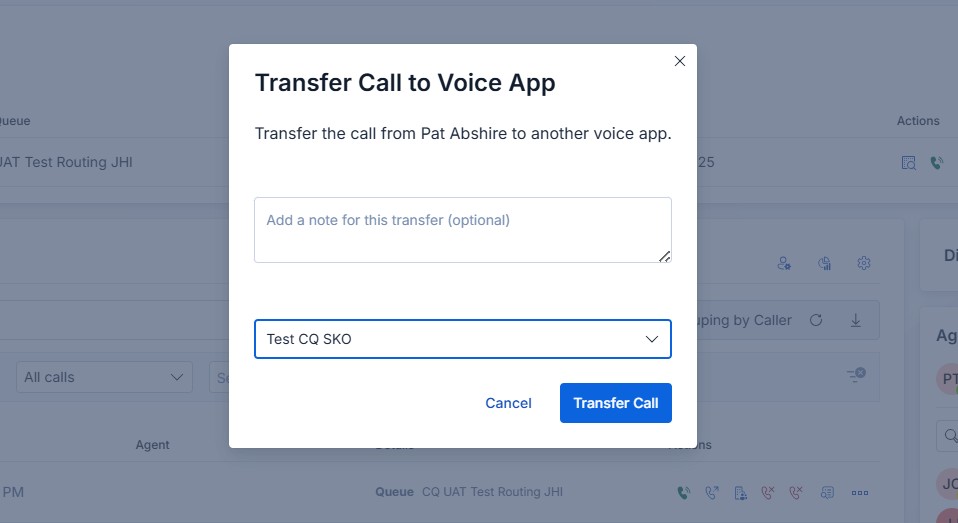
**Need to send the call to a different department?**

<figure><img src="https://8483818-files.gitbook.io/~/files/v0/b/gitbook-x-prod.appspot.com/o/spaces%2FdKIXVVI8Ve4TBJ4ft1WC%2Fuploads%2Fawu3LXqCgmVzFgP90qAC%2FTransfer%20to%20Voice%20App%20Easy%20Calling.jpg?alt=media&#x26;token=c430fddb-ae42-4607-968d-ca795fe25ff2" alt="Transfer to queue dialog"><figcaption><p>Transfer to another call queue (e.g., Billing, Technical Support)</p></figcaption></figure>

**How it works:**

1. Select **"Transfer to Voice App"**
2. Add a note (e.g., *"VIP customer, needs urgent help"*)
3. Choose the queue (e.g., "Billing" or "Technical Support")
4. Click **"Transfer"**

**What the customer experiences:**

* *"I'm transferring you to our billing team right now – they'll take care of this for you."*
* The call goes straight to the billing queue
* The next agent sees your note and has full context

{% hint style="info" %}
**Note:** You can only transfer to call queues created in Easy Calling. If you don't see a queue, ask your Voice App Manager to set it up.
{% endhint %}

***

### Option 3: Send to Voicemail

**Can't answer or the caller prefers to leave a message?**

**How it works:**

1. Click **"Send to Voicemail"**
2. The caller hears your voicemail greeting
3. They leave a message
4. You get a Microsoft Teams notification when the voicemail is ready
5. Listen to it later from Call History

**What the customer experiences:**

* *"You've reached \[Your Company]. We're currently assisting other customers. Please leave a message, and we'll call you back within \[timeframe]."*

**What you do next:**

* Listen to the voicemail
* Click **"Create Task"** to schedule a callback
* Get a reminder when it's time to call back

**No more missed callbacks.** Voicemails turn into tasks automatically–nothing falls through the cracks.

***

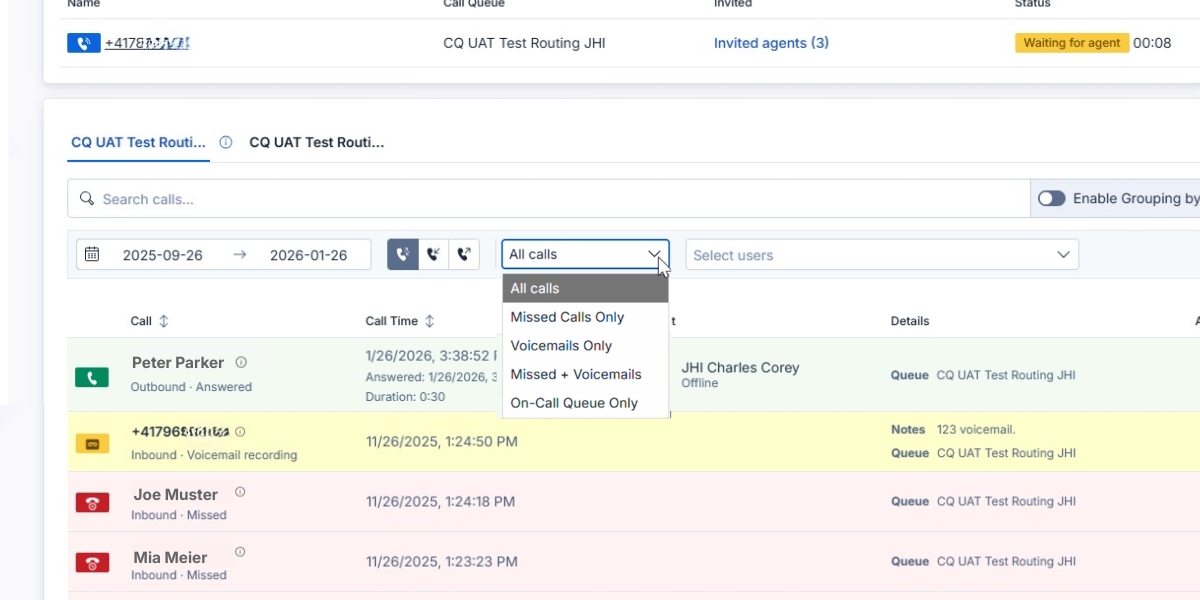
## Call History: Find Any Call in Seconds

**Your complete call log with powerful search and filters:**

<figure><img src="https://8483818-files.gitbook.io/~/files/v0/b/gitbook-x-prod.appspot.com/o/spaces%2FdKIXVVI8Ve4TBJ4ft1WC%2Fuploads%2FuoGBHiMUexFKsS2aPWz0%2F5%20Minute%20Quick%20Start%20-%20Explore%20your%20Call%20History.jpg?alt=media&#x26;token=9d966a36-711c-4bb5-8f6b-ff8435741d7e" alt="Call history with filters"><figcaption><p>Search and filter call history to find exactly what you need</p></figcaption></figure>

### What You Can Do:

**Search by:**

* Phone number
* Caller name
* Keywords in notes

**Filter by:**

* Date range
* Call queue
* **All calls**&#x20;
* **Missed calls** **only**
* **Voicemails only**
* **Missed + Voicemails**&#x20;
* **On-Call Queue only**&#x20;

### What This Means for You:

**Find calls instantly.** Your manager asks: *"Did anyone talk to Acme Corp today?"*

You type "Acme" in the search bar → Found in 3 seconds.

**Catch up after vacation.** You've been out for a week. Filter by "Missed Calls" to see what you need to follow up on.

**Learn from past calls.** Search for a specific customer to see their call history and notes – so you have context for the next time they call.

***

## Voice App Manager Features (For Supervisors & Team Leads)

**If you're a Voice App Manager, you get additional superpowers:**

### Real-Time Agent Status

<figure><img src="https://8483818-files.gitbook.io/~/files/v0/b/gitbook-x-prod.appspot.com/o/spaces%2FdKIXVVI8Ve4TBJ4ft1WC%2Fuploads%2FqorA4CLSnp2lO4BW9viY%2FReal%20Time%20Agent%20Status.jpg?alt=media&#x26;token=282db1ed-5f7f-42ec-aa31-cf603916a3f2" alt="Agent status dashboard"><figcaption><p>See which agents are available, on calls, or on break in real-time</p></figcaption></figure>

**What you see:**

* **Available agents** (ready for calls)
* **Agents on calls** (busy)
* **Agents on break/offline** (unavailable)

**Why this matters:**

* **Spot issues immediately.** If 5 calls are in the queue and everyone's offline, you know to send a Teams message.
* **Balance workload.** See who's taking most of the calls and adjust assignments.
* **No more guessing.** You know exactly what's happening right now.

***

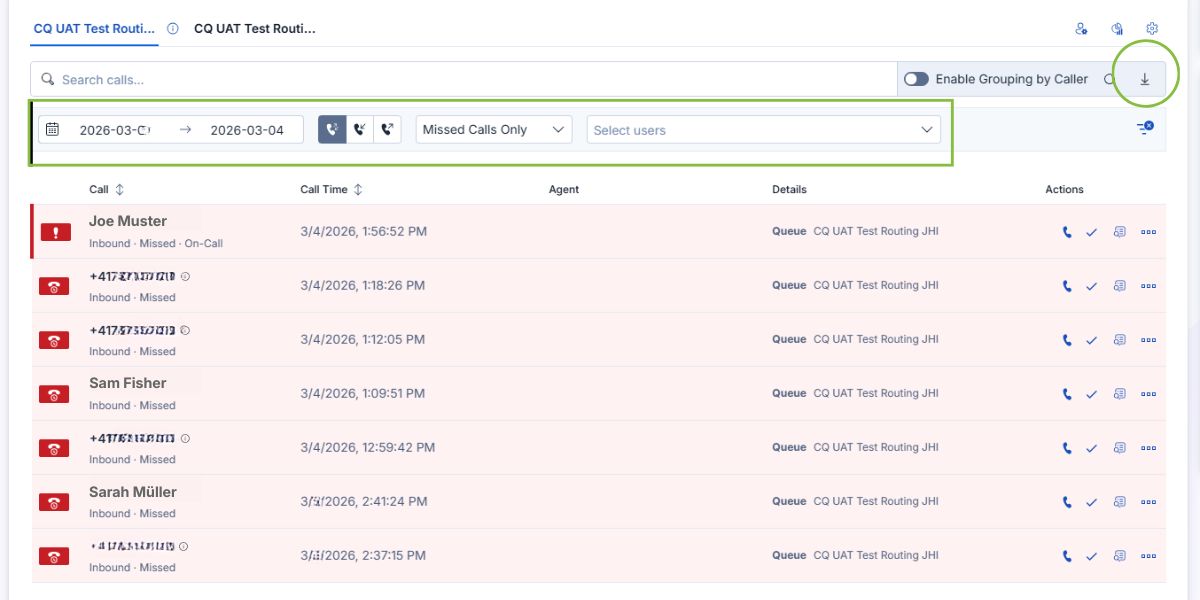
### Visual Analytics & Reporting

<figure><img src="https://8483818-files.gitbook.io/~/files/v0/b/gitbook-x-prod.appspot.com/o/spaces%2FdKIXVVI8Ve4TBJ4ft1WC%2Fuploads%2FdIdQzitk5TvhuXYt4EWE%2FInvestigating%20Missed%20Calls.jpg?alt=media&#x26;token=bc4d2a57-65fe-4764-88ba-d5b2dddb35b4" alt="Call analytics dashboard"><figcaption><p>Visual reports show call patterns and team performance</p></figcaption></figure>

<figure><img src="https://8483818-files.gitbook.io/~/files/v0/b/gitbook-x-prod.appspot.com/o/spaces%2FdKIXVVI8Ve4TBJ4ft1WC%2Fuploads%2Fgit-blob-2dda37902cb488ff221966ef9d94a6790287dbee%2Fimage.png?alt=media" alt="Call statistics charts"><figcaption><p>Charts and graphs make it easy to spot trends and peak times</p></figcaption></figure>

**What you can see:**

* **Calls per hour/day/week**
* **Average wait times**
* **Calls answered vs. missed**
* **Individual agent performance**
* **Peak call times**

**Why this matters:**

* **Data-driven decisions.** Stop guessing–see exactly when you need more agents.
* **Identify training opportunities.** If one agent has longer call times, offer coaching.
* **Report to leadership.** Export reports with one click–no manual data gathering.

***

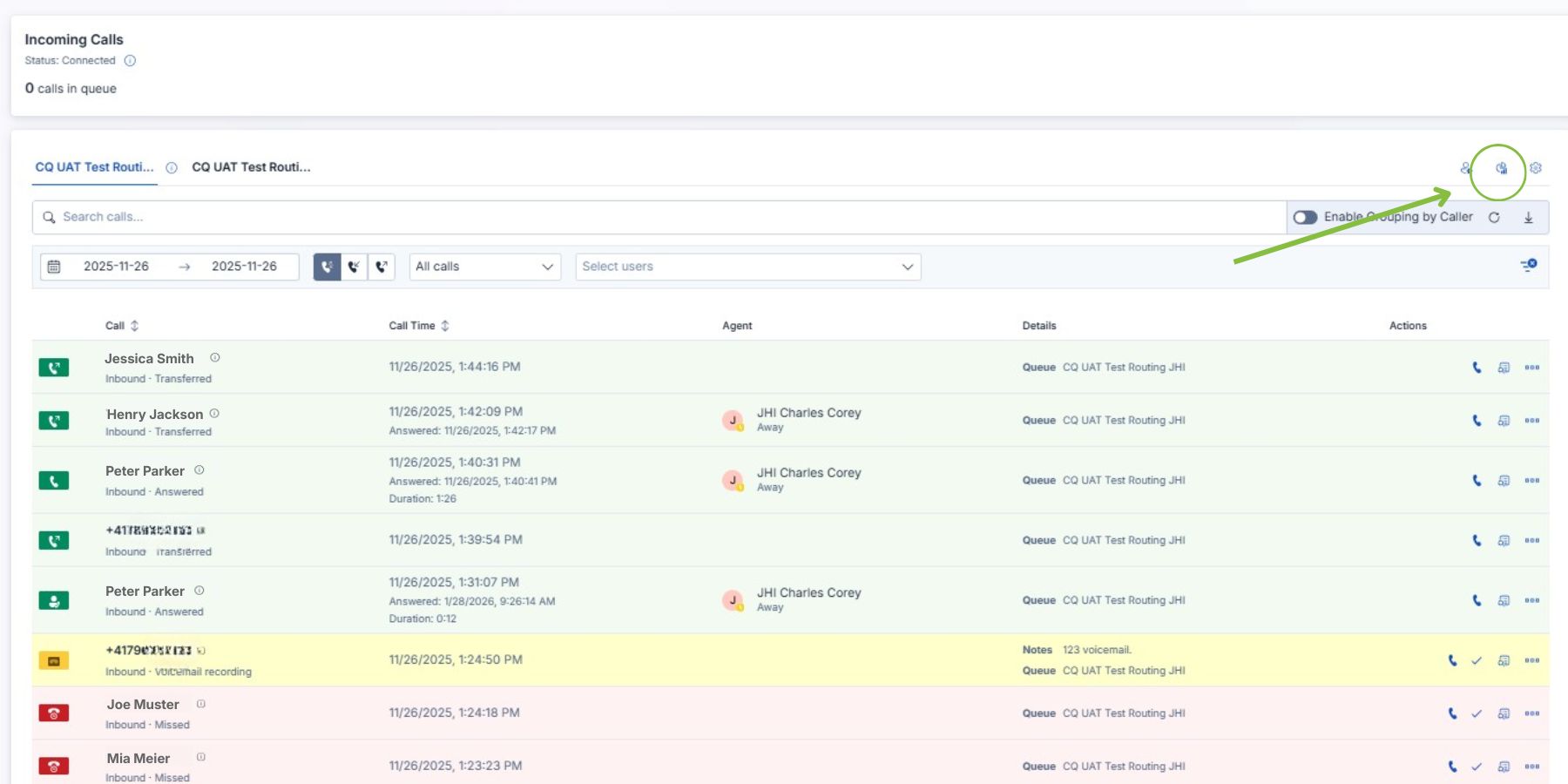
### On-the-Fly Configuration

**Adjust call queue settings without needing IT:**

<figure><img src="https://8483818-files.gitbook.io/~/files/v0/b/gitbook-x-prod.appspot.com/o/spaces%2FdKIXVVI8Ve4TBJ4ft1WC%2Fuploads%2FJAmeuV1MS6TZI1ammFs3%2FOn%20the%20Fly%20Configuration.jpg?alt=media&#x26;token=6fcf35cc-ada2-4fd2-9000-0a79eb60c609" alt="Queue settings panel"><figcaption><p>Update voicemail greetings, audio settings, and routing rules instantly</p></figcaption></figure>

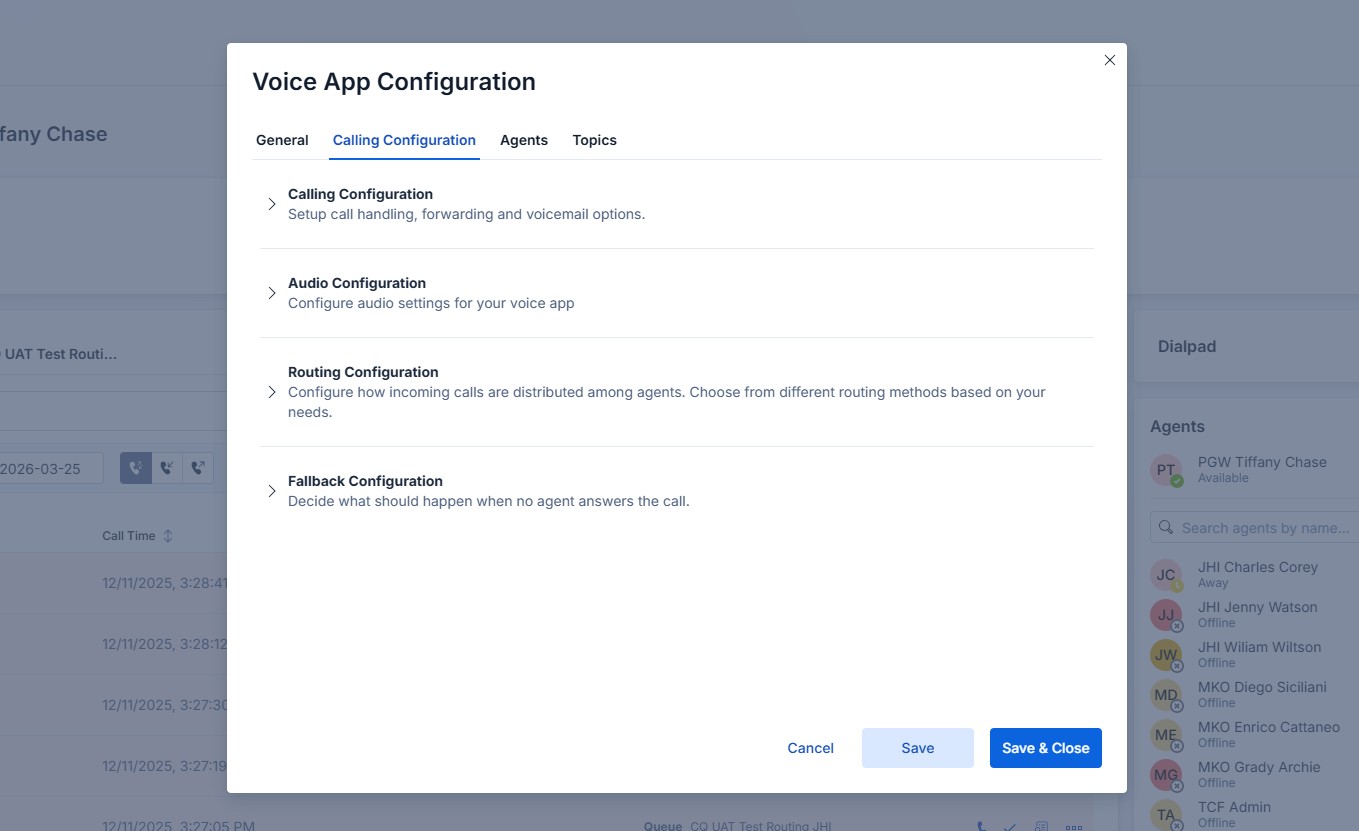
**What you can change:**

* **General Settings:** Configure the general settings for the voice app
* **Calling Configurations:** Set up sall handling, forwarding and voicemail options
* **Audio Configurations:** Configure audio settings for your voice app (Greeting Message, Waiting Music)
* **Routing Configuration:** Configure how incoming calls are distributed among agents. Choose from different routing methods based on your needs
* **Fallback Configuration (Timeout sctions):** Decide what should happen if no agent answers the call
* **Agent Management:** Add or remove agents from queues
* **Manage Call Topics:** Add or remove topics that can be used to categorize calls

<figure><img src="https://8483818-files.gitbook.io/~/files/v0/b/gitbook-x-prod.appspot.com/o/spaces%2FdKIXVVI8Ve4TBJ4ft1WC%2Fuploads%2FAYyy09vfNyM8NYvuBPZv%2FVoice%20App%20Configuration.jpg?alt=media&#x26;token=6ede3b65-ee54-43f1-9264-95d23cf1ae1c" alt="Audio settings"><figcaption><p>Configure how calls are distributed, define what happens when calls go unanswered, manage agents and tags</p></figcaption></figure>

**Why this matters:**

* **React quickly.** Training session tomorrow? Update the voicemail greeting in 2 minutes.
* **No IT tickets.** Make changes yourself without waiting days for IT support.
* **Test and iterate.** Try different ring times or routing rules and see what works best.

***

## Key Takeaways

**Easy Calling's interface is designed to save you time and reduce stress:**

* **Everything in one place** – No more switching apps
* **Know before you answer** – Caller ID shows names and context
* **Transfer with confidence** – One-click transfers with notes
* **Never lose a callback** – Voicemails turn into tasks with one click
* **Find calls instantly** – Powerful search and filters
* **Real-time visibility** – See what's happening right now (for managers)
* **Self-service configuration** – Update settings without IT (for managers)

***

## Want to Try It Yourself?

* [**5-Minute Quick Start**](https://docs.easycalling.easyplatform.app/getting-started/quick-start-guide) – Get hands-on in 5 minutes
* [**Best Practices – Call Life Cycle**](https://docs.easycalling.easyplatform.app/getting-started/best-practices-call-life-cycle) – Step-by-step walkthrough
* [**Day in the Life Guides**](https://github.com/easy-platform/easycalling/blob/main/docs/end-user/guides/day-in-the-life/README.md) – See how real users work with Easy Calling

***

**Ready to experience Easy Calling?** Open the app in Microsoft Teams and start exploring!