> For the complete documentation index, see [llms.txt](https://docs.easycalling.easyplatform.app/llms.txt). Markdown versions of documentation pages are available by appending `.md` to page URLs; this page is available as [Markdown](https://docs.easycalling.easyplatform.app/developer/lookup-integration.md).
# Lookup Integration
Integrating a custom lookup resource (Easy Lookup)
Easy Calling enriches calls with caller information (name, company, address, etc.) by running a lookup pipeline during call setup.
This document is intended for *external developers* integrating a custom lookup backend (“Easy Lookup”).
It explains:
* When caller lookup happens
* Which lookup sources are queried (and in which order)
* How to implement a compatible lookup service
### What gets enriched
Easy Calling keeps two concepts separate:
* **Caller**: the raw caller identity (typically the dialable phone number in E.164, or a user identity for internal callers).
* **LookupResult**: display-focused enrichment data (name/company/address/etc.) shown in the UI and notifications.
Lookup enrichment updates **LookupResult** and does not replace the raw caller identity.
### When lookup runs
Lookup is executed when needed, for example when:
* No lookup result exists yet.
* The current lookup result is incomplete.
While lookup is in progress, the UI may show a dedicated “resolving” state.
### Lookup sources and order
Lookup is evaluated in a fixed order (first match wins). Depending on tenant configuration and the caller identity, Easy Calling may query:
1. **Directory lookup for internal callers** (e.g., GUID / email-like identities)
2. **VIP caller mapping** (Voice App configuration)
3. **Custom lookup (Easy Lookup)**
4. **Shared mailbox contacts** (Easy Contact Sync)
5. **Microsoft Entra ID lookup**
6. **Public directory lookup** (e.g., search.ch, if enabled)
7. **Fallback** (no enrichment; the caller number is used as display)
The order can evolve over time; integrations should not rely on being the *only* lookup source.
### Integrating a custom lookup resource (Easy Lookup)
“Easy Lookup” is the built-in mechanism for integrating an external contact system without syncing into a mailbox.
#### Configuration (tenant level)
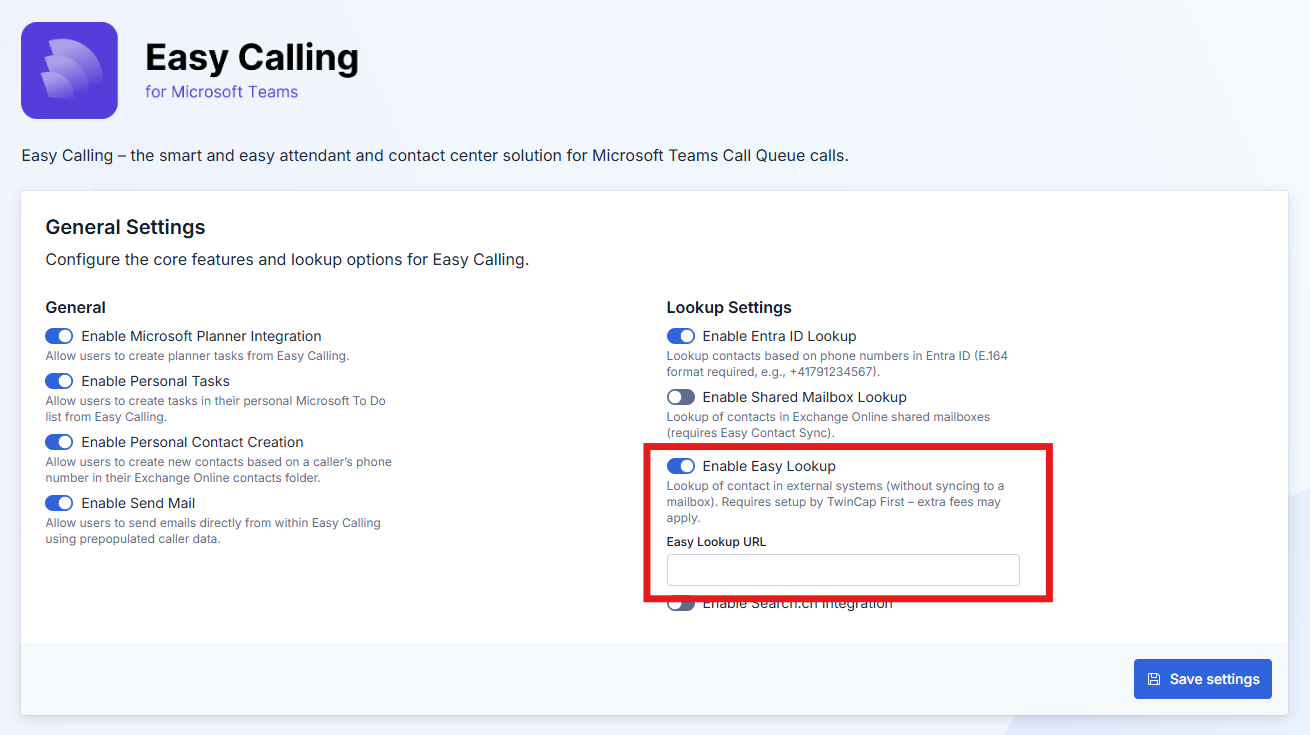
Custom lookup is driven by the tenant configuration. The adminitrator can configure the Lookup settings in the Easy Platform Configuration Center.
#### How Easy Calling calls your endpoint
Easy Calling performs the custom lookup using the Easy Platform Lookup Service (custom lookup). That implementation makes a **server-to-server HTTP POST** request to the configured `EasyLookupUrl`.
**HTTP request**
* **Method**: `POST`
* **URL**: exactly the value of `EasyLookupUrl` (no additional path is appended)
* **Headers**:
* `Content-Type: application/json; charset=utf-8`
* No additional auth / correlation headers are sent by default.
* **Body** (JSON):
Request body is JSON with a single field:
* `phoneNumber`: the caller identifier to look up (E.164 number like `+41...`).
{% hint style="info" %}
Notes:
* The request field name is **`phoneNumber` (camelCase)**. This is intentionally different from the usual PascalCase used in many Easy Calling payloads.
* The value is whatever Easy Calling currently considers the “caller” (often an E.164 number like `+41...`, but it can also be other caller identifiers depending on call type).
{% endhint %}
**HTTP response**
On a match, respond with:
* **Status**: `200 OK`
* **Body**: a JSON object that contains the response fields listed below.
Response fields:
* `Id`
* `Name`
* `Company`
* `Address`
* `Zip`
* `City`
* `State`
* `Country`
* `Phone`
* `MobilePhone`
* `Email`
* `Website`
* `IsSuccessfulResult`
Full JSON response (all fields):
```json
{
"Id": "customer-12345",
"Name": "Taylor Example",
"Company": "Example Corp",
"Address": "Example Street 1",
"Zip": "8000",
"City": "Zurich",
"State": "ZH",
"Country": "CH",
"Phone": "+41441234567",
"MobilePhone": "+41791234567",
"Email": "taylor.example@example.invalid",
"Website": "https://example.invalid",
"IsSuccessfulResult": true
}
```
Important behavior notes (first match wins):
* If your endpoint returns **any 2xx response**, Easy Calling will treat it as a **successful custom lookup** and will **not query later sources** (shared mailbox contacts / Entra ID / public directory / fallback).
* For that reason, if you have **no match**, do **not** return `200 OK` with an “empty” object.
**“No match” behavior (important)**
To allow Easy Calling to fall back to the next lookup source, return a **non-2xx** status code when you have no match.
* **Recommended**: `404 Not Found`
* Also acceptable: any other non-2xx that you consider semantically correct (e.g., `204 No Content` is discouraged because it can create noisy error logs).
Avoid:
* `200 OK` with `IsSuccessfulResult = false` or an empty `Name` — Easy Calling will still treat this as a match and stop the pipeline.
* `200 OK` with an empty/null response body — it will be treated as an error and logged.
**Retry and timeout behavior**
The EasyPlatform.Core lookup client uses a small retry policy:
* Retries up to **3 times** on `429 Too Many Requests` and on **5xx** responses.
* Backoff is exponential: approximately **2s, 4s, 8s** between retries.
* Other status codes (e.g., `401`, `403`, `404`) are **not retried**.
* Network exceptions are not guaranteed to be retried (the retry policy primarily handles HTTP status codes).
The underlying `HttpClient` uses the default .NET timeout behavior. Keep your endpoint fast (low seconds) to avoid delaying call setup.
**Authentication and securing the endpoint**
The custom lookup client does **not** send an Authorization header or any custom shared-secret header by default. If you need to secure the endpoint, typical options are:
* Put the endpoint behind an API gateway / reverse proxy and restrict access by **IP allow-list** / private networking.
* Use **mTLS** at the gateway edge.
If you require header-based authentication (API key, HMAC signing, OAuth, …), Easy Calling must be explicitly extended to send those headers.
#### What your lookup service must return
Your service should return a JSON object with the fields below.
Property naming:
* Use **PascalCase** property names (as shown) for the response.
* Do not rely on case-insensitive JSON mapping.
The UI and adaptive cards use the following fields (based on how `CallNotificationService` maps them):
* `Id`
* `Name`
* `Company`
* `Address`
* `Zip`
* `City`
* `State`
* `Country`
* `Phone`
* `MobilePhone`
* `Email`
* `Website`
* `IsSuccessfulResult`
A typical successful response should set `IsSuccessfulResult = true` and populate as many fields as possible.
If no match exists, return a **non-2xx** status (recommended: `404 Not Found`) so Easy Calling can fall back to other lookup sources.
#### Input normalization recommendations
To maximize match rates, normalize numbers in your lookup service:
* Prefer E.164 (`+41...`, `+49...`, etc.).
* Consider trimming spaces, hyphens, parentheses.
* If your backend stores national format, normalize both sides consistently.
#### Security considerations
Your lookup endpoint is called server-to-server by Easy Calling.
* Ensure the endpoint is not publicly open without authentication.
* If you want to enforce query-based auth (API key recommended)
### Troubleshooting
If lookup doesn’t enrich as expected:
* Confirm `EnableEasyLookup` is enabled and `EasyLookupUrl` is set for the tenant.
* Confirm your lookup endpoint is reachable from the bot runtime environment.
* Confirm the response is valid JSON and sets `IsSuccessfulResult = true` for a match.
* If you intentionally have no match, return a non-2xx (recommended: `404 Not Found`).